Lighting and Shadows
Volume shadows
Shadow casting is a project setting, off by default, and needs an editor restart. If it is off, the volume's Details panel shows Enable Volume Shadows (restart). See Installation.
Baking for the level
The buttons at the top of the viewer compute expensive results once and store them inside the asset. Save the asset afterwards, then run UPDATE MATERIAL so the material uses them.
| Button | Result |
|---|---|
| BAKE SCATTER | A small field holding the blurred fire and density. The material reads it once per sample instead of many times, and it looks smoother. Bake again after changing Scatter Radius or Scatter Falloff. |
| BAKE FIRE LIGHT | Per-frame position, size, colour temperature and brightness of the fire, used for Fire Light. |
| BAKE FLOW | How micro detail travels with the smoke, so the noise no longer swims or jumps. Requires calibrated velocity. |
A baked item shows as RE-BAKE, with an X to remove it. Bakes are never run automatically.
Fire Light
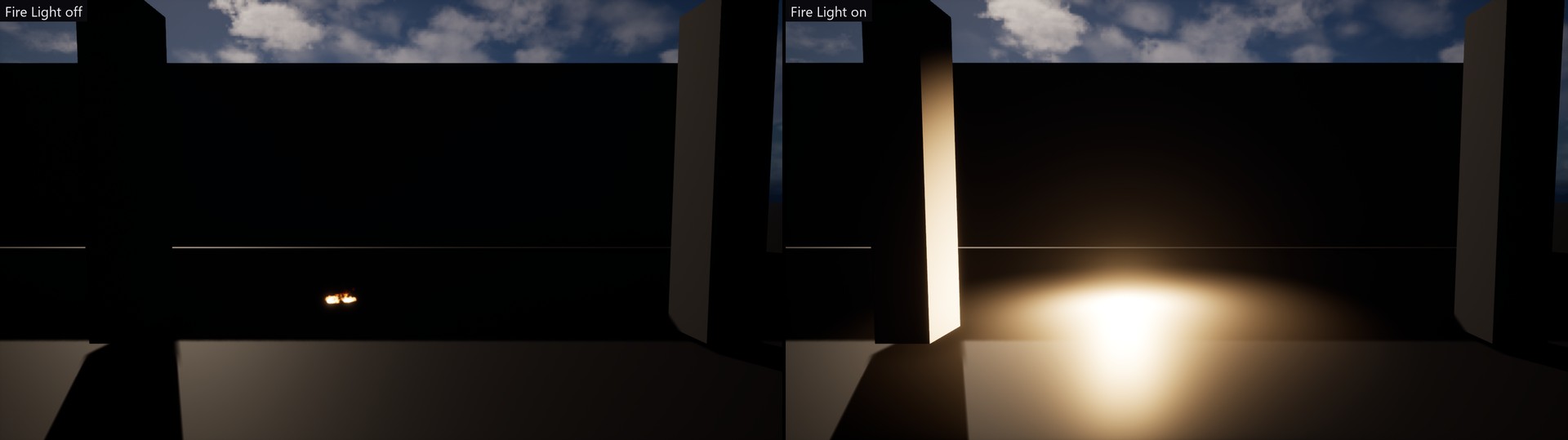
Fire Light makes one point light follow the fire, driven by the BAKE FIRE LIGHT data. One unshadowed movable light is cheap, so it is on by default. Without a bake it does nothing, and the Details panel says so.
| # | Setting | Default | Description |
|---|---|---|---|
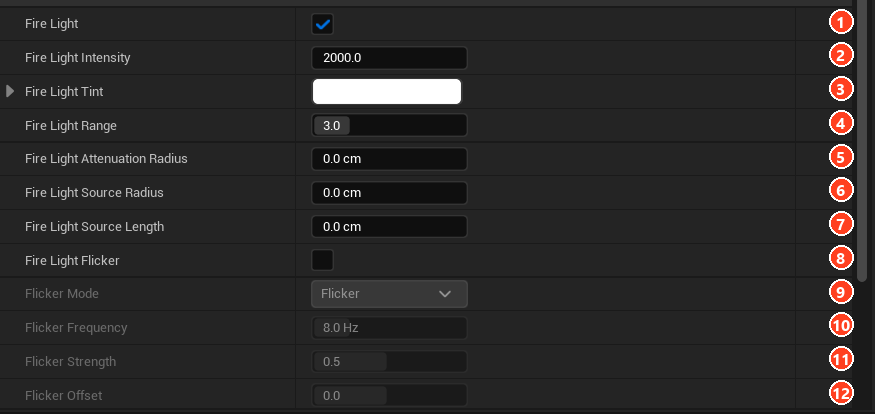
| 1 | Fire Light | On | Master switch. |
| 2 | Fire Light Intensity | 2000 | Candelas at the sequence's brightest frame. |
| 3 | Fire Light Tint | White | Multiplied over the fire's own colour temperature. |
| 4 | Fire Light Range | 3 | Reach as a multiple of the volume's size, used while Attenuation Radius is 0. |
| 5 | Fire Light Attenuation Radius | 0 | Distance where the light ends, in cm. 0 is automatic. |
| 6 | Fire Light Source Radius | 0 | Larger gives softer light. 0 is automatic per frame. |
| 7 | Fire Light Source Length | 0 | Stretches the light into a capsule. |
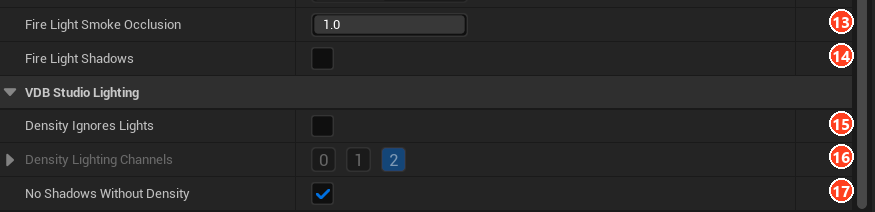
| 13 | Fire Light Smoke Occlusion | 1 | How much thick smoke dims the light. |
| 14 | Fire Light Shadows | Off | Costs a shadow-casting point light (six shadow views). |
| 8 | Fire Light Flicker | Off | Adds Flicker or Strobe on top of the baked curve (9 to 12). |
Keeping lights off the smoke
Density Ignores Lights (15, with Density Lighting Channels at 16) moves the smoke to other lighting channels, so lights you place, and Fire Light itself, light the scene but not the smoke. Its own emission, fire spill and sky light still apply. To keep the sun on the smoke, enable a matching channel on the Directional Light.
Several volumes together
By default each volume shadows only itself. Volumes do not darken each other, and they stay stable when placed far apart.
To let smoke cast shadows onto other smoke, press ENABLE VOLUME-TO-VOLUME SHADOWS under VDB Studio Rendering in the Details panel. Unreal then frames one shared shadow map around every shadow-casting volume, so volumes far apart can darken and flicker each other. The setting is project-wide and written to Config/DefaultEngine.ini.

No Shadows Without Density (17, on by default) removes fire-only volumes from the shared shadow map, since they would cast no shadow anyway.
With the lighting in place, you can animate and render the result.