Importing VDB Files
Drag a .vdb file into the Content Browser. For a sequence, drag any file from the numbered series. VDB Studio replaces Unreal's import dialog with its own.
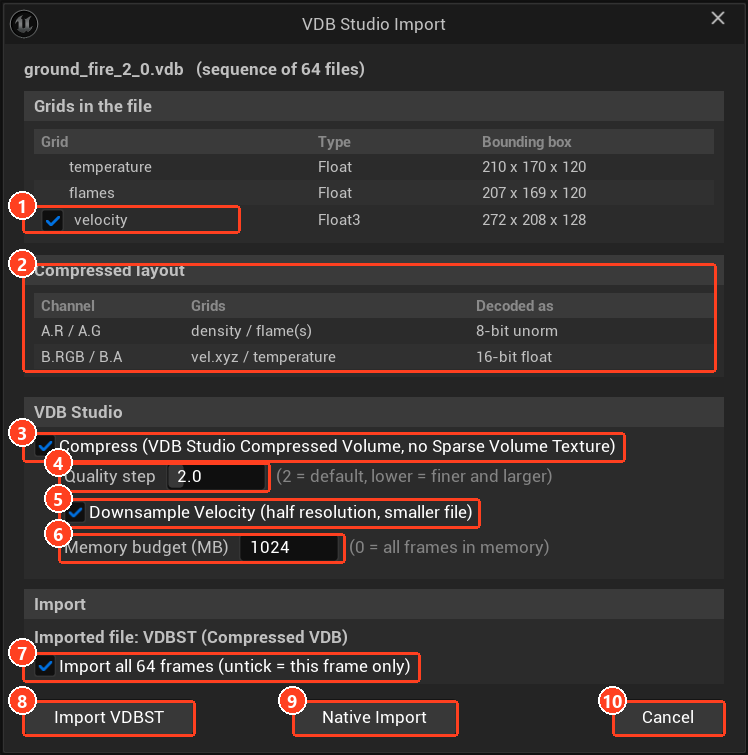
| # | Control | Purpose |
|---|---|---|
| 1 | Velocity tick box | Imports the velocity grid. Without it the file is smaller, but frame blending and micro detail flow are unavailable. |
| 2 | Compressed layout | Shows which grid goes into which channel. |
| 3 | Compress | On creates a VDBST, off creates an SVT. |
| 4 | Quality step | Compression strength. |
| 5 | Downsample Velocity | Stores velocity at half resolution. |
| 6 | Memory budget (MB) | Memory for coded frames during playback. |
| 7 | Import all N frames | Imports the whole sequence, or only the dropped file. |
| 8 | Import VDBST / Import SVT | Starts the import. The label follows Compress. |
| 9 | Native Import | Opens Unreal's own dialog. |
| 10 | Cancel | Closes without importing. |
Choose an asset type
| Type | Created by | Use it when |
|---|---|---|
| VDBST (Compressed Volume) | Compress ticked (default) | Almost always. About 7x smaller than an SVT, decoded on the GPU, no streaming latency. |
| SVT (Sparse Volume Texture) | Compress unticked | You need a standard engine asset, for example for tools that expect an SVT. |
| Unreal's own importer | Native Import | You want to pick channels and formats by hand. The plugin keeps no record of the layout. |
The viewer, materials and level workflow are the same for both types. Features specific to compressed volumes are marked in these pages.
Import settings
| Setting | Default | Description |
|---|---|---|
| Quality step | 2 | Compression strength, as a quantization step in 1/255 levels. 1 is finer and larger, 4 is smaller and softer. |
| Memory budget (MB) | 1024 | System memory the coded frames may use during playback. Frames beyond it stay on disk and are read ahead. 0 keeps every frame in memory. |
| Downsample Velocity | Off | Stores velocity at half resolution for a noticeably smaller file. Velocity is smooth, so the loss is small. |
| Import all N frames | On | Unticked imports only the file you dropped. |
Grids in the file lists what was found. The tick box beside the velocity grid controls whether it is imported. Without velocity the file is smaller, but frame blending and micro detail flow become unavailable.
Colour (Cd) grids are not imported. Smoke and fire are coloured in the material.
Press Import VDBST (or Import SVT). Velocity is calibrated automatically on a compressed import.
Channel layout
Every imported volume ends up in the same layout, which is what lets the viewer and generated materials work without setup:
| Texture | Channels |
|---|---|
| Attributes A (8-bit) | R density, G flames |
| Attributes B (16-bit float) | RGB velocity, A temperature in Kelvin |
Reimporting
Right-click the asset and choose Reimport to encode the source files again with new settings. The look, velocity calibration and baked data are kept.
Converting an existing SVT
Right-click an SVT and choose Create Compressed Volume (VDB Studio). The new asset is named <asset>_VDBST and is encoded from the source .vdb files.
With a volume in the project, double-click it to open the viewer.