Optimization
Measure first
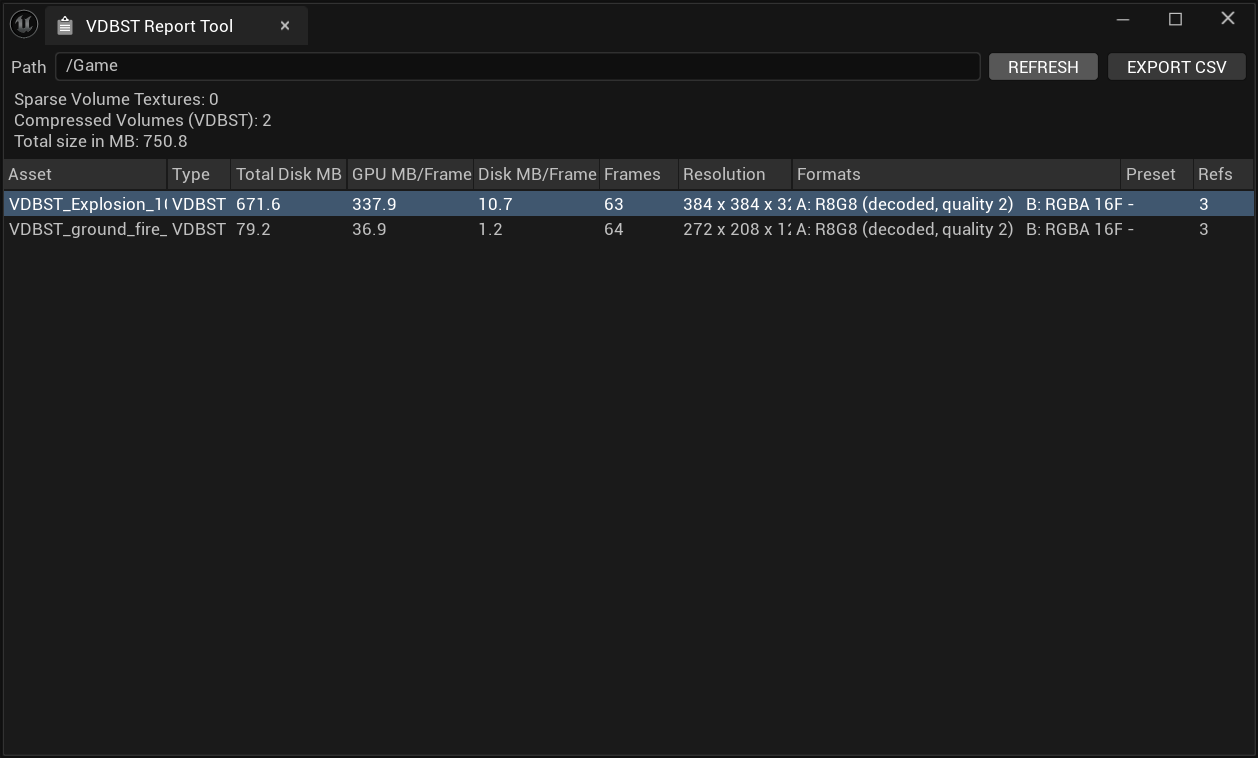
Volume Report, on the viewer's asset toolbar, lists every volume in the project with its resolution, GPU size per frame, disk size and referencers. EXPORT CSV writes the list to Saved/VDBStudio/.
Controls, cheapest first
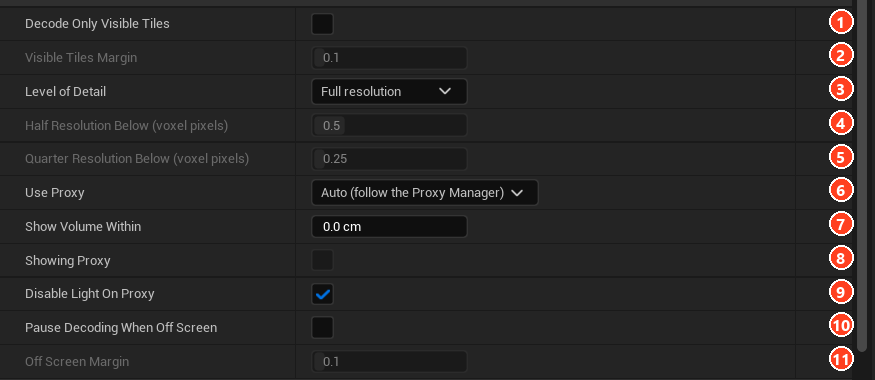
Settings are under Optimizations on the component, and apply to compressed volumes unless noted.
| Control | Effect | Trade-off |
|---|---|---|
| Frame Blend off | Decodes one frame, not two. | Stepped motion. |
| Material static switches | Removes unused features from the shader. | Set per instance. |
| BAKE SCATTER | One read per sample instead of many. | Bake again after changing radius. |
| Level of Detail (3) | Half needs about 1/8 of the video memory per frame, Quarter about 1/64. | Softer detail. |
| Decode Only Visible Tiles (1) | Skips tiles outside the view. | Undecoded tiles cast no shadows; raise Visible Tiles Margin if shadows go missing. |
| Pause Decoding When Off Screen (10) | Stops decoding while unseen; the clock keeps running. | Shadows from an off-screen volume freeze. |
Level of Detail > Auto chooses per view from the on-screen size of a voxel. Half Resolution Below (0.5) and Quarter Resolution Below (0.25) are in pixels of one full-resolution voxel.
For an SVT, use Streaming Mip Level instead.
Micro Detail has its own cost: keep Detail Fade Far as short as your shot allows.
Far Effects
At distance, a volume can hand over to up to three Niagara systems. Turn on Far Effects (1) and add entries to Far LODs (2), nearest first.

| Field | Default | Description |
|---|---|---|
| Effect | Niagara system. It receives a float user parameter named Fade. | |
| Fade Start Distance | 3000 cm | The effect begins to appear. |
| Fade End Distance | 4000 cm | The effect is fully visible and the previous layer has gone. |
| Spawn Distance | 2500 cm | The effect is created invisibly here, to warm up. |
| Skip Ahead Seconds | 3 s | How far it is simulated forward on spawn. |
A fully faded volume costs nothing. To dissolve particles rather than pop them, add MF_VDBStFarFade to the Niagara material's opacity chain.
Keeping the editor responsive
Proxy boxes replace volumes in the editor viewport only. They are never used in Play In Editor, Movie Render Queue or packaged games.
Place a VDB Studio Proxy Manager in the level. When the viewport stays below FPS Threshold (12) for Measure Over (2 s), managed volumes become boxes showing an image of the volume. A selected volume stays real, as does one within Show Volume Within.
The manager's buttons are Show All Volumes, Proxy All Now and Reset To Automatic. The component's Use Proxy (6) sets Auto, On or Off per volume. Capture Thumbnail in the viewer sets the image shown on the box.
With the volumes performing, the final feature makes them respond to gameplay.